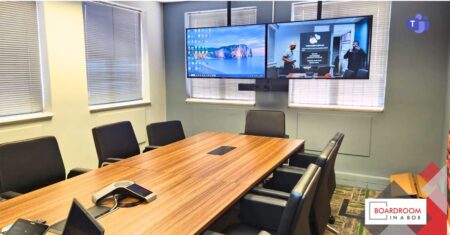
From huddle rooms to 20-seat boardrooms and control rooms, Boardroom In A Box integrates audio, video, and control into one system. One button touch starts the room. The result is consistent, reliable, intuitive rooms across your whole organisation. Designed, installed, and supported by one certified team.
Every room we design lands in one of three configurations. What separates them is how your people join. What they share is the same rule: nobody in the room should have to think. The site assessment tells you which fits your rooms and your platform mix; numbers belong to your specific room, and we scope them there.
Your laptop runs the meeting. Walk in, connect wirelessly or by one cable, and the room’s camera, microphones, and screen take over. Works with any platform your caller uses: Teams, Zoom, or Google Meet.
Fits: teams that meet across many platforms, and rooms shared with visitors and clients.
A certified, native Teams Rooms system with its own touch console at the table. The scheduled meeting appears on the console, and one tap on the invite starts it. No laptop needed, no sign-in scramble, smart cameras and full-room audio built in.
Fits: businesses that run on Microsoft Teams and want every room to behave the same.
The native Teams Rooms experience, plus a laptop input for everything else. Internal meetings start with one tap. When a client sends a Zoom or Meet invite, plug in and the room follows your laptop.
Fits: boardrooms that host both worlds, your own team daily and outside parties weekly.
Each configuration scales, but the kit inside it changes as rooms grow.
2 to 6 seats. An all-in-one video bar usually carries the room. Placement and configuration decide how well.
8 to 12 seats. Separate or ceiling audio, wider camera framing, and often dual displays enter the design.
14 to 20 seats. Distributed audio, multiple cameras, acoustic treatment, and a control system. Engineered seat by seat.
If your rooms span more than one band, or more than one site, standardising the experience across them is exactly what we do.
A certified engineer visits your room and tests what is there.
One team supplies, installs, cables, configures, and tests the room.
We walk your people through the room before we leave.
Support and maintenance agreements available per room or across your estate. AV Support
245+ installations since 2018 · Certified by Logitech, Yealink, Barco, and Microsoft · Level 1 B-BBEE
We install certified hardware from Logitech, Yealink, and Barco, on the platforms your business already runs.
It depends on your platform mix and who uses the room. The site assessment answers it for your specific rooms.
Often, yes. The assessment tests what is there and shows what can stay. You only replace what the room actually needs.
No. We are Microsoft certified and build native Teams Rooms, and we design for the platform your business runs on.
Yes. We are based in Centurion and install nationally.